Saturday, July 6, 2013

New Market

When developing a product, the choice of market boils down to these three alternatives[1].

Existing


You've got the existing market in which shops such as restaurants are established. The rules of the game are known, customers know what to expect and plenty of resources are when looking to establish one.

Re-segmented


There is the re-segmented market. A niche market in which a specialized product within an already existing market aims to change the rules of the game, such as the iPad. The customer knew what they had before and can be told about how why they should get this instead of that.

New


Lastly there is the new market. Here, the solution to the problem is unique and in some cases people aren't aware of ever having the problem in the first place, like with cloud computing. The main issue with this type of market is that it takes a considerable amount of time to get customer adoption. Since they went along just fine without you in the first place, you'll have to come up with something appealing enough for them want to replace it with one or more of their currently used products, like the iPhone did with phones and the PDA.

What about Pipi?


It doesn't fit in either one of those. Instead, the product does exist, the population knows how to use it and how beneficial it is only no one is taking the time to develop a product that is available for everyone. 

Remember the Sports Almanac from Back to the Future II? Marty went to the future and got that almanac, which contained sports statistics between the 1950s and 2000. Back in the 80s, he could then use those statistics to win safe bets on any sporting event up until the new millenia. Pipi is similar to that. I've been to the future and not only seen the many benefits available but also applied them to my own work and now I'm back, in the real world, forwarding my experiences to you via my own design. Doing so within a market without competition and plenty of demand. For what more could I ask?


References
1. Four Steps to the Epiphany by Steven Blank

"Everything is a file"

One of the defining factors about UNIX operating systems is it's use of files for everything[1]. Documents are files, images are files, but also processes and hardware such as the running session of Maya and your keyboard.

Universal Namespace


Accessing an image on Linux can be done by traversing to the directory in which that image resides and then read or write to it. Accessing a process can also be done by traversing to the directory in which the process resides and then reading or writing to it.

/home/image.png
/proc/photoshop

Now, clearly your brand new floppy disk drive is not a file. It's a collection of components physically soldered together in some factory in Utah. What Unix provides however is a unified mechanism for accessing the hardware in your PC and the documents on file-system. Lets look at an example.

Reading from a text document involves launching Notepad and giving it the file you wish to read. Writing to it involves much the same process, only this time Notepad is giving the filesystem something. Accessing the contents of your Shadows of Darkness Disk 6 involves in much the same way handing the file over to the appropriate reading mechanism and overwriting in turn means giving your Full Throttle Disk 54 to the writing mechanism of your original diskette. Makes sense? Of course it does. Lets move on.

What about Pipi?


Pipi likes this way of handling data. In addition to every asset that you create being a file, so is its users and running processes. So is its metadata and so are its events. This ensures that we can completely bundle components together without worrying about handles to external entities such as database entries or memory addresses. Moving an asset to another project? No problem, anything related to that asset is safely stored within its own hierarchy of files and folders.

The Unix "Everything is a File" isn't great with metadata


This is true. In Linux, the floppy disk is a mere file and a file-system only allows so much metadata to be appended to it. The date at which it was modified, its author and perhaps even a tag if you're lucky. This forces developers to use an alternative approach for its data about data, such as XMP information in photographs, which strays from the universality of everything in fact being files.

In Pipi "If it isn't a File, it's a Folder"


Pipi solves this by adding another dimension to files; parents. By storing something abstract, such as a user or process, as a folder instead of a file, we can append files, or even more folders, within. These files may represent XMP information, images or settings for that particular piece of data.

Folders are treated as files. They have a name, and extension and basic metadata such as dates and original author. In a file, content is a stream of bytes whereas in folders it is the files that it contains and Pipi accesses these folders as though they were files.

Advantages


Using folders for files has several advantages, the main one being uniformity and ease of use allowing less of a learning curve for developers and a lower rate of error. Another benefit is the modularity it provides. Logical entities can easily be compartmentalized and transferred without any loss of related information.

Disadvantages


While folders provide a common logical interface, they do come at a price. Traditionally, the metadata of files are stored in separate database structures, such as MongoDB. This separates the binary and metadata information of entities to where they can both perform at their best. Accessing hundreds of thousands of properties via the database model is many times faster than that of accessing it via individual files on disk.

Conclusion


While performance is an important factor in any activity, the encapsulation and uniformity provided by this approach is hard to overlook. When one thinks performance, we usually think about one of three things; it is either responsive, sluggish or a long-running process. It is therefore important to consider the environment in which your application runs and whether or not the plausible numbers in a high-activity situation require you to jump through hoops or whether you can direct your focus towards simplicity and stability instead.

In the case of Pipi, the domain for which within creative studios of a 1-100/ppl crew, activity peaks at three times during the day; in the morning (when artists all load up their scenes), during lunch (when long-running processes such as renders or pointcaching are set off) and at 6 pm (when everyone either saves their work or sets of an even longer running process for execution during the night). Since digital content is quite heavy on the file-size front, the master bottleneck in all three of these scenarios is the read/write performance of the server and in the case of a 100 people crew, a low amount of file accesses might hover around 1 read/sec (giving the crew a gentle amount of 2 min from sitting down to start working), a vanilla amount around 3 reads/sec and in busy situations around 50 reads/sec.

Mind you these numbers are mere expectations at this point and via the power given by the ease and usability of this approach, unexpected ways of accessing this data is bound to be discovered and in cases where file access does reach into the hundreds of thousands per second, the user will simply have to wait a few milliseconds before he or she can continue working.


References

Saturday, June 29, 2013

Finding a Common Language of Design pt. 1

It dawned upon me quite early that to design several interconnected parts of software, they would have to share a common language in terms of how they looked and behaved. Luckily, the default look and feel of an application developed under any operating system using Qt is identical to other applications built under the same operating system. It mimics the window frame, the drag and resize facilities, closing and minimizing behaviours and also, colors and sound. In fact, developing with Qt provides promise of "write once, run everywhere", or WORE, meaning that whatever you write will not only work on any platform, but also mimic the look and feel of that platform, while still performing as you designed.

"But then.." I hear you say, "..why not use that to your advantage when developing Pipi?". It's a fair question.

Pipi does not adhere to this flexibility of mimicking its host. This is due to the fact that Pipi is a cross-platform framework. It will be run on a variety of platforms (Windows, Linux and Mac) and thus the behaviour of its host platform will vary but its users, however, won't. Users will come and go and their environments may change, the very platform they work on may change for each project they enroll which is why it is so important to maintain a "beacon of light" and provide a consistent and streamlined UI that any artist can access and use without the slightest doubt of anything being different. Regardless of which platform the artist is working under.

This does not mean, however, that the practices put in place by these hosts are ignored. Throughout the evolution of software, users have come to expect many things from their interaction with computers and it is your responsibility to maintain these expectations if you decide to stray from the path. There is a saying which says that the greatest design is that which behaves just as users expect. This applies to any interaction design, not least so webpages. If you have ever found yourself entering an unfamiliar website with a goal in mind, only to come out of that site with goal achieved 5 minutes later not remembering exactly how you did it but that in fact you did, you have experienced a rare and well-designed site and should take note of its whereabouts and learn from its design. This has happened to me only a few times and sadly, their successfull design makes them the most easily forgettable websites out there. They provide no friction, no moment of wonder or scratching of the head and thus no time to commit this flawless design to memory.

As you might suspect, if you are designing for a fashion site or any other market promoting content rather than functionality, this may not be the best route. For design that evolves around ease-of-use however, focus and simplicity (to borrow from the mantra of Steve Jobs) is key.

Product Development as a Film Process

As I was working the other day, it struck me that the approach I had adopted in developing the graphical context of Pipi is very similar to how I would develop the graphical content for Film. In fact, the more similar I made it, the more comfortable and predictable it became. So, if you're familiar film production, I'd like to share this approach with you as it has helped me in materialising my ideas into concrete matter in a rapid fashion.

Firstly, lets have a brief look at what the process of making film looks like today. A director has a vision. The director refines this vision, discusses it amongst his peers and starts materialising his thoughts onto paper in the form of text (the script) and art (storyboards). Then, one or more studios are hired to perform the bulk of work required in turning the director's vision into reality. Starting with more concept art, he then progresses into pre-visualisation in which the film is blocked out in time and space to represent his vision as a kid would when trying to convey his idea using crayons and the surface of your kitchen table. Its crude, its fast and inaccurate. This is when the vision is tested against its target audience, this is where the vision is iterated upon until the foundation is strong. Once a foundation has been built and once the vision is shared amongst everyone involved in its inception, production begins.

Lets stop here for a bit and look how this correlates to product development. An entrepreneur has a vision. The entrepreneur refines his vision, discusses it amongst his peers and starts materialising his thoughts onto paper in the form of text (requirements) and art (wireframes). Then, one or more companies are erected to perform the bulk of work required in turning the entrepreneur's vision into reality. Starting with more wireframes, he then progresses into pre-visualisation.

This is where I at first got stopped in my tracks and gazed out into the horizon, looking for ways to achieve the same fluidity as what has become natural to me when working in film. To "sketch" your vision and to then iterate on this sketch. But how can one sketch in product development? How can a product be tested against an audience without having it actually built? In User Interface and User Experience (UI/UX) Design, there is this concept of wireframing. Wireframing shares many similarities with that of storyboarding. It is a crude and simple, yet clear and fast version that facilitates iteration. UI/UX designers have been using it for years apparently, and it makes perfect sense for interface design just as storyboarding does to film.

The interesting part, however, is what comes next.

In film, once the script has been written, storyboards laid out, it is time to put the vision against the clock and make a so called animatic. The animatic serves as a useful guide to timing and continuity. Do shots fit together in time? Does this sequence make sense when played out like this? How do we go from this shot to this other one? The animatic answers all of these questions and more.

In developing Pipi, the most natural thing for me to do was to apply the same concept of an animatic, but to User Interface Design. So I took my storyboards drawn hastily on paper, refined them in photoshop to look like the product I had in mind and simply animated the UI with a mocked up version of a cursor so as to give the appearance of a user interacting with my future software.

Click to play
This is great! I can now easily send this off so anyone and, without further explanation, the recipient would understand not only what it looks like and what it can do, but also how those things are done.

Taking this one step further, we can insert the sequence of images into a demo context, such as an operating system, Windows in this case, and host application, Maya.

Click to play
As you can see, there are actually two separate user interfaces being demonstrated simultaneously, one spawning the other, while the fictional user clicks his way through the menu items to achieve his goal. Additionally, the video contains some backing explanation to the side of the window, accentuating things not clear from simply looking at the screen.

Using these techniques, I can iterate on an idea I just finished plotting on paper to the level of what you just saw in these videos in less than a day's worth of work each. And at such high level of clarity, I can collect feedback on features, user experience and visual design more accurately and quickly from my target audience, having the next version out the following morning. If not the very same day.

To finish off, I'd like to provide you with one final demonstration. A user experience and feature demonstration of another application that was hastily developed in order to gain the same level of understanding that one of the previous "wirematics" could have provided, except the execution time was closer to two weeks of Python coding.

Click to play

What is Pipi

It has taken me a long time to define Pipi. As I made my way from studio to studio over the course of the past five years, each one had this "something" about it that made work a much more pleasant experience. Turning these, usually repetitive and cumbersome tasks, into welcome distractions.

Of the 10+ studios I've worked at, each and every one displayed patterns of the "earlyvangelist". The characteristics are as follows; the earlyvangelist:

  1. Has a problem
  2. Is aware of having a problem
  3. Has been actively looking for a solution
  4. Has put together a solution out of piece parts
  5. Has or can acquire a budget

I remember this one artist of a mid-sized house here in the UK who told me he had suggested to management that he wanted to build better tools that could help reduce the rate of mistakes and boost productivity of their crew, but the benefits was unseen by management and so never allowed him to proceed.

Management is not to blame, however. It is difficult to visualise the abstract benefits of what you do not know. It reminds me of a famous quote by Henry Ford. "If I had asked people what they wanted, they would have said faster horses."  Although fake, its message holds true. It is a trait of human nature to try and improve on what we have by mere optimisation rather than stepping outside of that box and into unfamiliar territory. The territory of innovation.

Developing tools is expensive. Both in terms of money and time. There is an inevitable period of trial-and-error when breaking new ground. But what you get out of this process is invaluable. Not only will it accelerate your rate of delivery, it will enhance it, make it stronger and more accurate. The rate of mistakes will drop significantly and the happiness-factor of your workforce will increase.

_____________________________________________________________________________________________

As I have spent the past year refining this idea and the solutions that came with it, the smoke has cleared and my vision is slightly less blurry. I would now like to give you an overview of what some of my conclusions thus far.

What is Pipi?

Pipi is a Digital Content Creation (DCC) framework for the film, commercial and games industries.

Why Pipi?

Digital content creation is rapidly getting more and more divided into areas of special expertise and along the way we have forgotten to keep the pieces in sync. Pipi aims to solve exactly that.

How does it work?

Pipi is a framework. It provides you with an essential set of tools along with a foundation upon which to build your own tools that fit into your studio's unique way of working. It integrates with the major existing applications, such as Maya and Nuke, and frameworks delivered by third-party developers, such as Shotgun and FTrack, to help take the hassle out of fast-paced production development.

Tools?

Pipi ships with six essential tools that serve as pivot-points for your work and own custom tools development. These tools, in order of relevance, are Launcher, Inspector, CreatorLibrary, Publisher and Handler

I will now go over the supplied set of tools in more detail.

_____________________________________________________________________________________________

Launcher


Main entry-point for artists. This is what is booted up at the dawn of each day as artists begin their work. It supplies artists with an overview of each project and its content along with the ability to manage projects from a higher-level point of view;  creating sequences, editing assets, removing shots is all performed via the Launcher.

_____________________________________________________________________________________________

Inspector


Each job, each asset and each shot come bundled with data. This "data about data" is referred to as metadata, and shots et. al. are in turn known as entities.

As the number of entities grow, metadata helps to keep things organized. To give an example, it can be used to keep track of frame-ranges in a shot, comments in playblasts or artist-supplied descriptions for assets. The Inspector then provides the means to visualise this data.

In addition to visualising data, the Inspector also provides the means to monitor what is referred to as "events". Events are recorded throughout the use of Pipi. Any time an artist comments on a shot, publishes his/her work or playblasts a shot in preparation for dailies, the recorded event can be monitored by other artists. This helps artists working on the same asset or shot stay in sync with each other and makes it easy to stay up to date on the overall progress for each chunk of work.

_____________________________________________________________________________________________

Creator


As you start a new job, the Creator provides the means of adding the necessary sequences, shots, assets and variants into that job. It is in the Creator where you append or remove metadata such as camera information, storyboards, references, audio or video et al. The metadata can then be accessed by artists, other Pipi tools or your custom tools.

Creator is most commonly accessed via the Launcher. Whenever an entity is edited, Creator will appear.


_____________________________________________________________________________________________

Publisher


I mentioned that in a studio, work is divided into chunks and that each chunk is delegated to specialists. These specialists communicate with each other by "publishing" their finished material onto a central database. Other specialists can then access this material knowing that it conforms to a fixed set of studio rules. Background props, for instance, may have to conform to a certain polygon-count, character setups may have to provide a certain set of controls familiar to animators and so on.

The Publisher then acts as the funnel through which each shared chunk of work is passed before it reaches the public space. The publisher will perform sanity-checks (e.g. "is the geometry visible?") on your work to ensure it conforms to the already published work, in addition to help artists meet the required guidelines.

_____________________________________________________________________________________________

Library


Once an artist has published his/her work, it can be found in the Library. The Library provides a birds-eye view of each published entity of each job within a studio. It allows artists not only to load animations, point-caches and assets, but also to perform an at-a-glance inspection of metadata, relations between it and other entities, their history and preview the data directly in the Library. This makes the process of finding what you are looking effortless for any artist.

_____________________________________________________________________________________________

Handler


The Handler is the only application-specific tool so far. It deals with the specifics of how an application deals with assets, such as rigs or point-caches. To aid in explaining I'll use Maya as case-in-point. In Maya, once an asset such as a rig has been loaded, it provides the user with a few options. Such as whether the asset should be imported or referenced, which version to load and the ability to up- or downgrade assets. Things which makes a difference only within the specific domain in which the artist is working at the time.

I mentioned that it is application-specific. This means that for each application to make use of it, it has to be provided with an implementation. This is due to the alternating ways applications deal with assets. In Nuke, an asset is an image-sequence loaded via its internal nodes known as "Read". Maya can also load image-sequences, but does so via different means. The Handler provides a high-level abstraction from these technicalities that can be manipulated via it's user interface so that the artist only has to focus on the "what" and not the "how".

Initially, the Handler will be provided for all major DCC applications, such as Maya, Softimage and Houdini, along with Nuke and Mari.

With these tools at hand, an additional set of tools are being developed. Such as a relational viewer to display relationships between the entities within a studio, a rigging framework including "weightshift" and an animation library utilities for storing poses and reusable segments of animation.

Hope you enjoyed and thanks for your attention.

Friday, May 31, 2013

Folder Layout pt. 3


A Better Way

Wouldn't it be great if we could avoid separating any data at all? If all data could live happily under the same roof?

The end goal is to simplify data navigation. You want to be able to locate what you need as quickly as possible. As we have seen, some data may be logically paired with other data and so a hierarchical approach may seem like a good idea. Other data however provide a less rigid constraint towards its source, such as a user and his shots, and may perhaps be better suited for tagging and filtering. A user working on a shot deals with the shot "entity", various rigs and output pointcaches supporting assets such as audio, images, notes, feedback and so on. The user does not care whether some data are stored in one location and some are not, the user only wishes to quickly retrieve the data he needs at the time he needs it whilst still being able to work on the physical files his chose application. We would like to find one unified way in which all of this is possible.

A closer look at the previous example reveals some more superfluous use of structure.


Some data within a cg production however have no binary data, and yet contain metadata as well as other pieces of data. Consider an asset such as the Simulation Setup for a Ladybug. The rig has no binary information related to it, it is "abstract", yet it contains versions in which binary information are stored. Each version in turn has metadata, such as date of creation, author and changelog and so on.

At the root, we have an item referred to as Studio. The studio contains everything related to a studio as a whole. This includes jobs, users, settings, running processes and so on.

Each item hosts information relevant to its type. Job holds data relevant to a single job. This includes all sequences and shots, assets, users working on this job and related metadata such as who the client is, when the job is due, media such as storyboards, reference images and videos.

Moving forward, we have the Asset which contains everything related to a single asset, such as a Character. This includes models, textures, rigs, shaders and associated data and relationships to other data.

Certain types of objects are designed to host certain other types of objects.

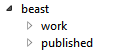
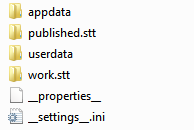
In this example, the job beast is host of the items work and published. From a users perspective, when mining a job for resources, be it assets or which shot to get on working with next, this is all that is required at this level. On disk however, beast may host a multitude of items other than its resources.

The items appdata and userdata host application-specific data and users home directories respectively. Note the extensions. These are rather ugly too look at and would be better represented by icons other than the default windows explorer ones. Certain names also contain reserved keywords. In this case, __properties__ host generic metadata about beast and __settings__.ini contains user editable data, as hinted towards via the .ini extension.

The various types required to make up a studio and all of its resources can grow quite large, that's why it is important to structure it in an as manageable form as possible.

Firstly, lets look at some of the assumptions we can make about the users of Pipi.

The target goal is to facilitate the creation of CG images and as such the major components can be broken down into Sequences and Shots, each shot capable of having one of more Assets.

Assets include elements such as Characters, Props, Vehicles, Set Dressing objects etc. Each Asset may contain additional elements per department. I'll bring in Bob and the Ladybug project from the previous post to aid in the explanation.

Bob works in modeling on the hero character LadybugLadybug has got several models associated with it, such as the body, the face, character-specific props such as clothing, a wristwatch and so on. Whatever model Bob eventually finishes, since Bob is in the Modeling Department, his published material will go under the department category Modeling.

When Bob works on the body model in Maya, Bob saves his scene every now and then. Generally, Bob will only share material with other departments once he is happy with his results and so application files, such as scene versions, are stored separately from those happy results. This helps keep the database clean and minimal, whilst still allowing Bob to make as many revisions to his scene-files as he needs. This results in the following hierarchy.

Monday, May 13, 2013

Auto Rigging pt. 1

A somewhat overloaded term. What does it actually mean to "autorig" something? Firstly, let's look at why one would consider autorigging for their project.

Why?

Lets have a look at a simple task, such as setting up forward kinematics controls for an arm.


The video is sped up 5x and takes about two minutes to play out. Its quite the task! Also, note that after the joints have been drawn, no new information is added. The joints contain both position, orientation and hierarchical information which is all that is required for the subject to behave as expected. Everything past that point is implementation detail, technicalities, that can be automated. Also note that the drawing is the least time consuming process.

I think this will suffice as motivation for automation.

What else? 


Well, a human usually has two of these along with legs, each side being identical to the other in any meaningful regard. That means that the additional time it takes to also set up the other side is of equal length to the one we just set up, meaning that what you do you'll have to do four times to cover each limb of a character.

Put simply, rigging is a repetative task. The very many things you do for each setup are densly similar to tasks you just did or have done previously. How about a bullet list of some of the main things that automation can help you with?

Symmetry

This is a big one. We can cut out job in half if one side simply followed the other. Even if your characters suffers from asymmetry, such as zombies, chances are that features are still to be repeated to the other side.

Common features

Many things have been done before and works. Automation could keep you from reinventing the wheel more than once

Time well spent

Time spent repeating is time wasted and nothing hinders creativity more than that of wasted time. You'll spend half the time performing repetative tasks and the other half thinking of ways around those tasks. Not having to worry about things already solved will allow you to focus on moving forward and make things better and faster.

Ok, let's get crackin'


Hold on there. Even though the end result is to have an intutive control rig for the animator, the way to get there is often different with each artist. Before deciding whether to automate something, it is important to understand exactly what it is you wish to automate and such information is best taken from experience. If you're thinking "I dislike rigging and want to automate it in order to get it out of my way" you're reading the wrong post. Once you know what to do, you must also understand it. Remember, you can't design what you don't understand.

Lets have a look at another video, this time the video has been sped up only two times, is half as long and  contains twice as many features on four times as many limbs as the previous video.


What happened there?


As you can see, the result of this video is the same as the previous video, and more, in less time. What is missing from this video are things that have been automated based on the initial drawing of the joints along with their naming schemes. Remember, anything beyond that point is implementation detail and is repetative with each setup. Once you know how to setup forward kinematics, the same rules apply for each and every forward kinematic enabled setup you do and the same goes for inverse kinematics, twisting, bending, stretching, pinning, space switching and so on.

Currently working on this tool, the next incarnation will do more without requiring any more work from the user. Thats the beauty of automation.